Article Guide
Use these jump points to move through the article faster.
Traffic is the lifeblood of any WordPress site. Whether you’re running a blog, a business website, a WooCommerce store, or an agency portfolio — without visitors, every other investment in design, content, and features produces no return. The challenge is that “how to get more traffic” is a question with many valid answers, and most advice online lists tactics without explaining which ones actually move the needle, in which order, and why.
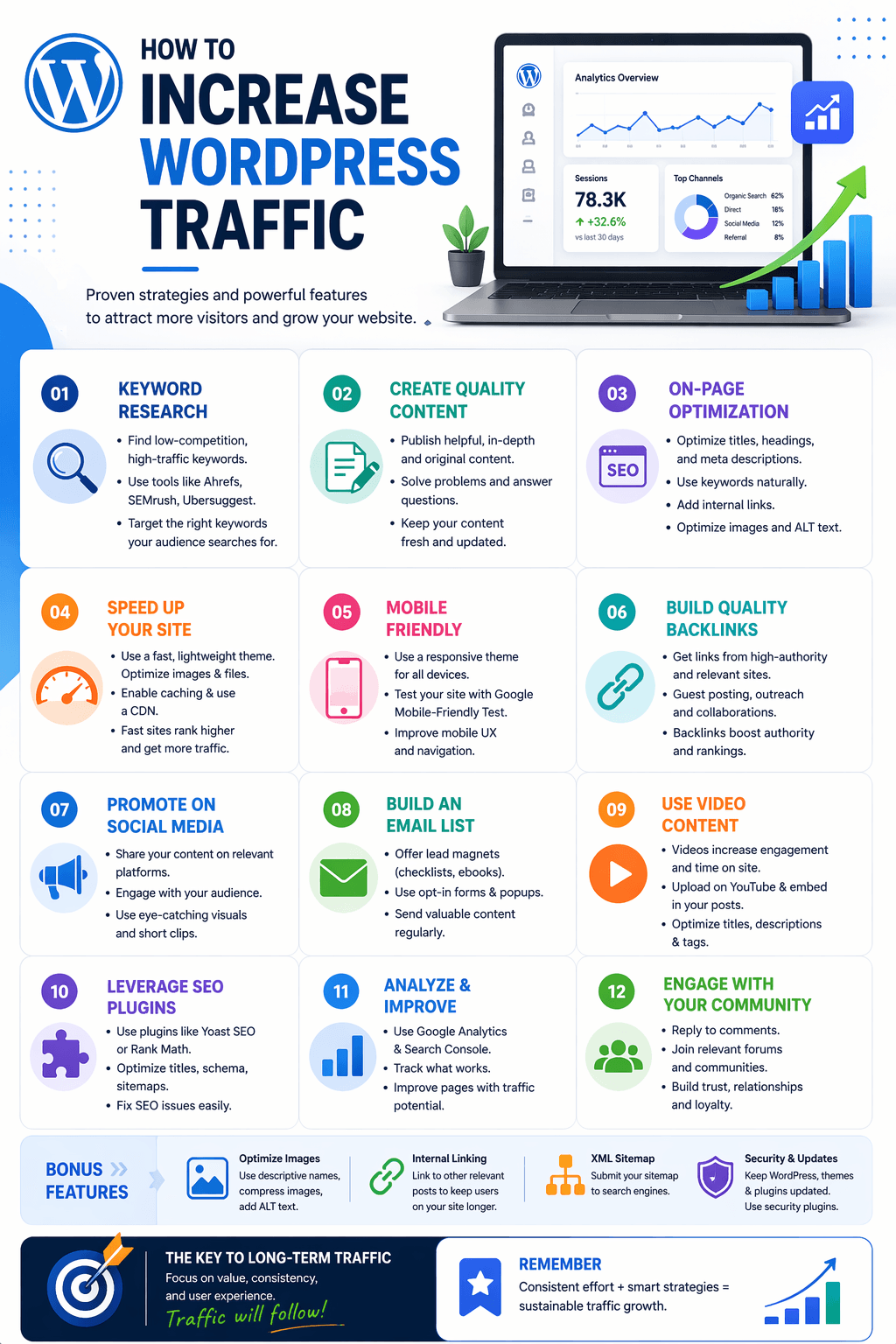
This guide gives you 25 specific, actionable strategies organized by category — SEO and organic, content, technical performance, social and distribution, and email. Each strategy includes what to do and why it works. Implement them systematically rather than randomly, starting with the highest-leverage items for your current situation.
Category 1: SEO Strategies (Strategies 1–10)
Organic search is the highest-ROI traffic channel for most WordPress sites because it compounds over time — a well-ranking post continues generating traffic for months and years without ongoing spend. These strategies build and protect your organic visibility.
Strategy 1 — Target Long-Tail Keywords With Real Search Volume
Head keywords (“WordPress SEO,” “digital marketing”) have massive search volumes but are dominated by high-authority sites with years of backlink accumulation. Long-tail keywords (“how to add FAQ schema to WordPress without coding,” “best WordPress SEO plugin for WooCommerce stores 2026”) have lower volume but dramatically lower competition and significantly higher conversion rates.
Use Google Keyword Planner, Ahrefs, or WPMazic SEO Pro’s Rank Tracker to identify long-tail variations of your core topics with 100–1,000 monthly searches. Target these systematically and build toward broader terms as your domain authority grows.
Strategy 2 — Optimize Every Post’s Title Tag and Meta Description
You may already be ranking in positions 5–15 for multiple keywords — but if your title tags are weak or your meta descriptions don’t compel clicks, you’re leaving traffic on the table. A 50% improvement in click-through rate at position 8 doubles your traffic from that keyword without any ranking improvement.
Review your top 20 pages in Google Search Console. For any page with impressions but below-average CTR for its position, rewrite the title tag (more specific, add numbers or outcome language) and meta description (clearer value proposition, include keyword). Implement changes in WPMazic SEO’s post panel within minutes per page.
Strategy 3 — Add FAQ Schema to Ranking Posts
FAQPage schema enables expandable question-and-answer dropdowns directly in Google’s search results. A post ranking at position 5 with FAQ rich results takes up significantly more SERP real estate than a position 1 result without it — dramatically increasing click-through rate.
Identify your top 10–20 ranking posts that contain or could contain genuine FAQ sections. Add FAQ sections to the content, then implement FAQPage schema through WPMazic SEO Pro’s Schema Builder. Validate each in Google’s Rich Results Test. Measure CTR improvement in Search Console over the following 4–6 weeks.
Strategy 4 — Fix Crawlability Issues Blocking Traffic
If Google can’t crawl or index your pages correctly, all your content and optimization work produces no traffic. Check Google Search Console’s Coverage report for: pages accidentally set to noindex, pages blocked by robots.txt, pages returning 404 that should be live, and duplicate content issues.
WPMazic SEO’s global settings let you review indexation rules across all post types. The robots.txt editor lets you verify crawl permissions without FTP access. Fixing a single accidentally noindexed post that was ranking before can recover significant traffic immediately.
Strategy 5 — Build Internal Links to Your Most Important Pages
Internal links distribute link equity from your established high-authority pages to newer or deeper content. Every internal link you add to a popular post pointing to a newer post accelerates that newer post’s ranking timeline.
Identify your 10 most important pages (product pages, pillar posts, high-value landing pages). For each, identify 5–10 existing posts that could naturally link to it. Add those internal links with descriptive anchor text. This alone can move posts from page 2 to page 1 over 4–8 weeks — without any new content or backlink building.
Strategy 6 — Refresh Underperforming Existing Content
Content ranking in positions 5–20 for their target keyword is often just one improvement away from page-one visibility. A 2023 post with outdated statistics, missing sections, or thin coverage that was once enough to rank is now underperforming because competitors have published better content since.
Audit your top 20 posts by impressions in Search Console. For any post ranking consistently below position 5, run a SERP analysis on its target keyword: what have the current top-ranking pages covered that yours hasn’t? Update your post, add those sections, freshen statistics, and update the dateModified in your Article schema. Google recrawls updated content quickly and often responds with ranking improvements within weeks.
Strategy 7 — Target Featured Snippets
Featured snippets — the answer box appearing above position 1 results for many informational queries — generate significant traffic even from position 5–10. Structure your content to target them: answer the primary question in a clear, concise paragraph of 40–60 words, or in a numbered list if the query implies a process.
Search your target keyword in Google and check if a featured snippet exists. If one does, model your answer paragraph or list to directly address the query in the format Google is already using. If none exists, your comprehensive, well-structured answer has a strong chance of capturing that position.
Strategy 8 — Implement Comprehensive Schema Markup
Schema markup enables multiple types of rich results beyond FAQ: HowTo cards (for tutorial content), Product schema with star ratings (for WooCommerce), LocalBusiness schema (for local businesses), and BreadcrumbList schema (for site hierarchy display). Each rich result type increases your SERP footprint and CTR at the same ranking position.
Use WPMazic SEO Pro’s Schema Builder to implement the relevant schema type for each content category on your site — Article for blog posts, FAQPage for posts with FAQ sections, HowTo for tutorials, Product for WooCommerce pages. Validate all schema in Google’s Rich Results Test after implementation.
Strategy 9 — Optimize for AI Search Citation
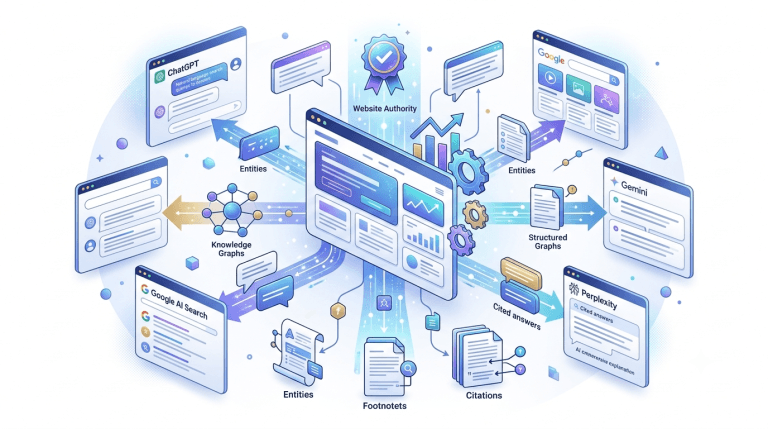
Google AI Overviews appear for a growing percentage of informational queries. Being cited in an AI Overview provides brand visibility even for zero-click searches, and cited pages often see increased branded searches and some direct click-through. Structure your content with direct answer paragraphs in the first 100 words, clear heading hierarchies, and FAQPage schema — the three elements AI systems most consistently pull from when selecting citation sources.
Strategy 10 — Submit and Monitor Your XML Sitemap
An XML sitemap helps Google discover and index your content faster — particularly important for new posts and recently updated content. Submit your sitemap in Google Search Console, then enable WPMazic SEO‘s IndexNow and Search Ping feature — this notifies search engines automatically every time you publish or update a post, accelerating indexing to hours rather than days or weeks.
Category 2: Content Strategies (Strategies 11–17)
Content is the engine of long-term traffic growth. These strategies ensure your content creates maximum traffic opportunity per piece published.
Strategy 11 — Publish Comprehensive Pillar Posts on Core Topics
A pillar post is a comprehensive, authoritative piece covering a broad topic from every important angle — typically 3,000–6,000+ words. Pillar posts rank for multiple keywords simultaneously (the main keyword plus dozens of related long-tail variations), attract more backlinks than shorter posts, and anchor your topic cluster’s internal linking structure.
Identify your 3–5 core topics and publish or upgrade a comprehensive pillar post for each. These become your highest-traffic assets over time and the anchor from which all cluster content links.
Strategy 12 — Build Topic Clusters Around Your Pillar Posts
A pillar post without supporting cluster posts captures traffic from broad keywords. A pillar post with 8–12 supporting cluster posts targeting related subtopics captures traffic from the entire topic’s keyword landscape — the pillar’s broad keywords plus every specific long-tail keyword covered by cluster posts.
For each pillar post, identify 6–10 subtopics worth dedicated posts. Publish those posts, link each back to the pillar, and link the pillar to each cluster post. The result is a self-reinforcing topic cluster that grows in ranking authority as each new cluster post adds to the network.
Strategy 13 — Repurpose Top Content Across Formats
A high-performing blog post can become: a YouTube video (which can rank in Google’s video results independently), a LinkedIn article (reaching professional audiences), a podcast episode topic, an infographic (for social sharing and embed links), a Twitter/X thread, and an email sequence. Repurposing extends a single content investment’s traffic reach across multiple channels without creating new content from scratch.
Identify your 5 highest-traffic posts from Google Analytics. For each, produce at least one repurposed format. A 3,000-word blog post becomes a 15-minute YouTube video — and that video, embedded back into the blog post, can improve the post’s own dwell time and ranking signals.
Strategy 14 — Target “People Also Ask” Questions as Content Opportunities
The “People Also Ask” box in Google search results reveals related questions real users search for around your topic. Each PAA question is a potential blog post topic, a FAQ section entry, or a subheading within a larger post. They often represent low-competition long-tail keywords with clear informational intent.
For any topic you’re planning to write about, search it in Google and screenshot all PAA questions that appear. Ensure your content addresses each relevant PAA question — either as dedicated sections or FAQ entries. Posts that comprehensively address PAA questions are more likely to capture both the organic result and the PAA box position.
Strategy 15 — Publish Original Research and Data Studies
Original data — surveys, studies, analyses — attracts two types of traffic that general blog posts don’t: direct traffic from people searching for statistics on the topic, and backlink-driven traffic as other content creators cite your data in their articles. A single well-executed research post can generate dozens of backlinks from a single outreach campaign.
Survey your customers or subscribers about a relevant topic. Analyze publicly available data in a new way. Run a study on your product’s performance metrics. Publish the results as a dedicated data post, promote it to relevant publications, and use it as a link building asset in ongoing outreach.
Strategy 16 — Update and Republish Your Best Performing Content Quarterly
Content that ranks well today may not rank as well in six months if the information becomes outdated, statistics age, or competitors publish more comprehensive alternatives. A quarterly content refresh cycle — updating statistics, adding new sections, improving examples — keeps your best traffic assets competitive without starting from scratch.
Identify the top 10 posts by organic sessions in Google Analytics. Refresh each one quarterly: update any statistics or version references, add any missing perspectives from current search results, improve internal links to newer related posts, and update the post’s dateModified in Article schema through WPMazic SEO.
Strategy 17 — Create Content for Each Stage of the Buyer Journey
Traffic from a single content type is fragile. A site that only publishes informational how-to posts attracts top-of-funnel readers who may never convert. A site that only publishes product pages gets no organic informational traffic. Cover all three intent types deliberately: informational (how-to guides, explainers), commercial (comparisons, reviews, best-of lists), and transactional (product pages, pricing pages, conversion-focused landing pages).
Map your existing content across these three types in a spreadsheet. Identify gaps — typically most sites are over-indexed on informational content and thin on commercial comparison content. Fill the gaps with deliberate commercial-intent posts that connect your audience’s research phase to your product or service offering.
Category 3: Technical Performance Strategies (Strategies 18–21)
Technical performance affects both rankings and visitor retention. Slow pages rank lower and lose visitors faster — compounding the traffic problem on both the acquisition and retention side.
Strategy 18 — Pass Core Web Vitals on Mobile
Google uses Core Web Vitals — LCP, CLS, and INP — as ranking signals. Failing these thresholds (LCP above 2.5s, CLS above 0.1, INP above 200ms) can suppress rankings for competitive keywords regardless of content quality. Check your scores in Google Search Console’s Core Web Vitals report and PageSpeed Insights. Fix the largest issues first: unoptimized images (LCP), undefined image dimensions (CLS), and heavy JavaScript (INP).
Strategy 19 — Compress and Serve Images in WebP Format
Unoptimized images are the leading cause of slow WordPress sites and poor LCP scores. Install an image optimization plugin (Imagify, ShortPixel, or Smush), configure it to compress images on upload and serve WebP format automatically. This single change typically reduces page weight by 30–50% and produces measurable LCP improvements within days of implementation across your entire image library.
Strategy 20 — Implement Caching and a CDN
A caching plugin generates static HTML files of your pages and serves them to visitors without running PHP and database queries each time. Combined with a CDN that serves assets from servers geographically close to visitors, this combination typically reduces load times by 40–70% for most WordPress sites. WP Rocket, LiteSpeed Cache, or W3 Total Cache handle caching. Cloudflare’s free tier provides a reliable CDN layer.
Strategy 21 — Reduce Plugin Count and JavaScript Load
Every plugin adds PHP execution overhead and often adds JavaScript to your pages. Plugins you’ve installed and forgotten are costing you performance. Audit your active plugin list quarterly — remove anything inactive or redundant. Consolidate functionality: using a single plugin like WPMazic SEO for SEO + redirects + schema + analytics connections replaces 3–4 separate plugins that would each add individual performance overhead and conflict risk.
Category 4: Social Media and Distribution Strategies (Strategies 22–23)
Organic search builds sustainable long-term traffic. Social and distribution strategies build faster-cycle traffic that amplifies each piece of content you publish — and the engagement signals from social traffic can reinforce your organic rankings over time.
Strategy 22 — Build a Content Distribution System, Not Just a Publishing System
Most WordPress site owners publish content and hope people find it. A distribution system ensures every piece of content reaches your existing audience immediately upon publication. Build your distribution channels: an email list you notify on every new post, a LinkedIn presence where you share key insights from posts, a Twitter/X account where you post key excerpts, and relevant community spaces (WordPress groups, Slack communities, Discord servers) where you share genuinely useful content.
The goal is a traffic spike from your distribution channels on publication day, combined with compounding organic traffic that builds over weeks and months. The initial social traffic generates engagement signals that can accelerate organic ranking timelines.
Strategy 23 — Optimize Social Sharing Appearance With Open Graph Tags
When someone shares your WordPress content on social media, the platform pulls the title, description, and image from your page’s Open Graph meta tags. If these aren’t set — or are poorly written — the shared link looks unprofessional and generates fewer clicks.
WPMazic SEO generates Open Graph tags automatically from your post settings, including the Dynamic OG Image feature that creates properly sized social preview images from your featured image. Review the Social tab in each post’s panel to confirm OG title, description, and image are populated and optimized. A well-presented social share card can double or triple the clicks a shared link generates.
Category 5: Email and Retention Strategies (Strategies 24–25)
Email traffic is often overlooked in WordPress traffic strategies because it requires building an audience first. But an email list of 1,000 engaged subscribers can generate more reliable traffic per new post than months of SEO work — and that traffic arrives the day you publish, not weeks later.
Strategy 24 — Build and Actively Grow an Email List
Add email opt-in opportunities throughout your WordPress site: a sidebar widget, a content upgrade within popular posts, a pop-up or slide-in (use these carefully — aggressive pop-ups hurt Core Web Vitals and user experience), and a dedicated subscribe page. Offer genuine value for subscribing — a free guide, a checklist, a mini-course relevant to your audience.
Email list building is a long game, but the compounding effect is significant. An email list grows with every post, promotion, and subscriber referral — and every email you send to that list is a traffic event for your WordPress site. For a WordPress plugin site like WPMazic, the email list is also a direct line to your most engaged potential buyers.
Strategy 25 — Send a Weekly or Biweekly Content Email
Don’t just build a list — use it. A regular email to your subscribers featuring your latest post, a curated tip from the blog, or an exclusive insight keeps your audience returning to your site consistently. Regular senders build stronger list engagement, which keeps open rates high and prevents deliverability issues from list inactivity.
Format your content emails for click-through: a compelling subject line, a brief teaser of the post’s key insight (enough to generate curiosity, not enough to satisfy it), and a clear link to “Read the full post on wpmazic.com.” Track click-through rates and which content topics generate the most email engagement — this is direct data on what your audience wants more of.
WordPress Traffic Growth Priority Framework
Not all 25 strategies deliver equal results at every stage. Use this framework to prioritize based on your current situation:
If you have existing content but traffic has plateaued:
Start with Strategies 2 (title/meta optimization), 3 (add FAQ schema), 5 (internal linking), and 6 (refresh underperforming posts). These improve performance of what you already have — the fastest path to traffic improvement from existing assets.
If you have a newer site with limited content:
Focus on Strategies 1 (long-tail keywords), 11 (pillar posts), 12 (topic clusters), and 10 (sitemap/IndexNow). Build content infrastructure first — traffic growth follows content coverage.
If your traffic has dropped suddenly:
Check Strategies 4 (crawlability issues), 18 (Core Web Vitals), and review Google Search Console for any manual actions, coverage errors, or sharp drops corresponding to known algorithm updates. Fix technical blockers before optimizing content.
If your traffic is mostly search-engine dependent:
Diversify with Strategies 22 (social distribution), 24 (email list building), and 13 (content repurposing). Traffic from a single channel is fragile — algorithm updates, policy changes, or competition shifts can dramatically reduce it. Multi-channel traffic is more resilient.
Measuring Your Traffic Growth
Traffic growth strategies are only as good as your ability to measure what’s working. Set up these measurement tools if you haven’t already:
- Google Analytics 4: Track sessions, users, page views, and conversion events. Set up organic traffic as a segment to track SEO-driven traffic separately from other sources.
- Google Search Console: Track impressions, clicks, CTR, and average position per page and per keyword. The Performance report shows exactly which queries are driving traffic and how efficiently.
- WPMazic SEO Pro Rank Tracker: Monitor your target keywords’ Google positions weekly inside WordPress, without needing a separate rank tracking subscription.
- WPMazic SEO Pro Analytics Connector: Pull Search Console and GA4 data into your WordPress admin dashboard — review performance alongside your SEO settings without switching between tools.
Review these metrics monthly at minimum. Track 3–5 core KPIs: monthly organic sessions trend, average position for your top 20 target keywords, CTR trend for top pages, referring domains trend (backlink growth), and email list size growth. These five metrics tell you whether your traffic growth strategies are working before the results show up as revenue.
Growing WordPress traffic in 2026 is entirely achievable — but it requires systematic execution rather than random tactics. The strategies in this guide compound on each other: better on-page SEO improves rankings, better schema improves CTR, better content earns backlinks, better speed retains visitors, better internal linking distributes authority. Each investment builds on the previous ones.
Start with the highest-leverage items for your current situation, measure consistently, and add strategies as your site matures. The sites that dominate organic search in any niche did exactly this — consistently, for long enough for the compound effect to become undeniable.