Article Guide
Use these jump points to move through the article faster.
Every WordPress SEO task — writing a post, setting a title, building internal links, structuring your site — starts from the same place: knowing which words and phrases your audience actually uses when they search. That’s keyword research. Get it right and every other SEO effort multiplies. Get it wrong and you spend months creating content that nobody is looking for.
Keyword research isn’t complicated in principle. But in 2026, it requires more nuance than plugging a word into a tool and writing about whatever has the highest search volume. Google’s understanding of intent, entity relevance, and content quality has matured to the point where matching the right keyword to the right content type, at the right level of depth, for the right audience stage — is what actually determines rankings.
This guide covers the complete keyword research process for WordPress: how to find keywords, how to evaluate them, how to match them to the right content type, how to plug them into your posts with WPMazic SEO, and how to track whether they’re working. Whether you’re starting a brand-new WordPress site or auditing a site with hundreds of posts, this process applies.
Part 1: Understanding What Keyword Research Actually Achieves
Before picking up any tool, it’s worth being clear about what good keyword research accomplishes — because it’s broader than most people assume.
It Tells You What Your Audience Is Thinking
Every search query is a window into what someone needs at a specific moment. “How to speed up WordPress” is a person with a slow site who needs a solution, not a product pitch. “WPMazic SEO vs Rank Math” is someone comparing options before a purchase decision. “Buy WordPress SEO plugin” is someone ready to pay right now.
Keyword research maps your content to these moments. It answers the question: “What is my audience thinking and searching for at each stage of their journey?” — and lets you create content that meets them exactly there.
It Prevents Wasted Content Effort
Publishing a post that no one searches for is a common and costly WordPress mistake. It wastes your time, creates thin content that dilutes your site’s quality signal, and generates no traffic. Keyword research tells you — before you write — whether there’s actual search demand for a topic.
It Structures Your Entire Site’s Architecture
Advanced keyword research isn’t just about individual posts. It maps your entire content landscape — which topics deserve pillar posts, which deserve cluster posts, which should be pages rather than posts, and which should be skipped entirely. This topic cluster architecture is how modern WordPress sites build topical authority at scale.
It Connects Directly to Revenue
For a plugin company like WPMazic, keyword research answers: “What are people searching for that leads to needing our products?” Someone searching “how to add FAQ schema to WordPress” is, a few steps later, a potential WPMazic SEO Pro customer. Mapping that journey through keyword research means your content funnel serves both your readers and your business.
Part 2: The Four Types of Search Intent — the Foundation of Good Keyword Research
Search intent is the most important concept in modern keyword research. Google has become extremely good at identifying what type of result a searcher actually wants — and it ranks content that matches that intent over content that simply contains the keyword.
There are four intent types:
Informational Intent
The searcher wants to learn or understand something. They have a question and want an answer, explanation, or guide.
Examples: “what is schema markup,” “how does WordPress caching work,” “why is my WordPress site slow”
Best content format: Blog posts, guides, tutorials, explainer articles
On wpmazic.com: The majority of your blog content targets informational intent — explaining WordPress SEO concepts, technical setup guides, and comparison frameworks.
Navigational Intent
The searcher wants a specific website or page. They already know where they want to go.
Examples: “WPMazic login,” “wpmazic.com,” “WPMazic SEO documentation”
Best content format: Your homepage, product pages, and documentation — whatever the specific destination is
Note: You can’t rank for competitors’ navigational terms. But you can rank for your own branded navigational queries, which is why a complete, well-structured homepage and product page matters.
Commercial Intent
The searcher is comparing options and moving toward a decision. They’re evaluating but haven’t committed yet.
Examples: “best WordPress SEO plugin,” “WPMazic vs Yoast SEO,” “WPMazic SEO Pro review,” “WordPress SEO plugin comparison 2026”
Best content format: Comparison posts, review posts, “best of” roundups, feature breakdown articles
On wpmazic.com: Your existing comparison posts (WPMazic vs Yoast, WPMazic vs Rank Math, WPMazic vs Traditional Plugins) directly serve commercial intent searchers who are one decision away from purchasing.
Transactional Intent
The searcher is ready to act — buy, download, sign up, or install.
Examples: “buy WPMazic SEO Pro,” “WPMazic SEO Pro download,” “WPMazic pricing”
Best content format: Product pages, pricing pages, landing pages with clear purchase CTAs
On wpmazic.com: Your product pages at /wpmazic-seo/ and /admin-framework-pro/ directly serve transactional intent. These should be optimized with transactional keywords in their titles and meta descriptions.
The key principle: Match your content type to the intent behind the keyword. A product page targeting an informational keyword will underperform. A blog post targeting a transactional keyword will frustrate searchers who wanted to buy, not read. Intent match is as important as keyword match.
Part 3: Keyword Research Tools for WordPress — Free and Paid
You don’t need expensive tools to start finding good keywords. Here’s the full toolkit from free to paid.
Free Tools
Google Search Console
If your WordPress site has been live for any time, start here. Google Search Console shows you the actual search queries that are generating impressions and clicks on your existing pages. This is real-world data, not estimates — it’s what your current audience is searching to find you.
How to use it for keyword research: go to Performance → Search Results, and look at the Queries tab. Sort by Impressions to see what’s bringing views, and sort by Clicks to see what’s bringing traffic. Look for:
- Queries with high impressions but low CTR — your content ranks but the title or meta description isn’t compelling enough to earn the click
- Queries ranking in positions 5–15 — these are “almost ranking” keywords where a content improvement could push you to page one
- Queries you’re ranking for that you didn’t intentionally target — these are signals of what topics your audience associates with you
Google Keyword Planner
Free through a Google Ads account (you don’t need to run ads to use it). Enter a seed keyword and get monthly search volume ranges, competition levels, and related keyword suggestions. The volume data is presented as ranges rather than exact numbers on the free tier, but it’s sufficient for prioritization.
Google Autocomplete and People Also Ask
Type any keyword into Google’s search bar and observe: the autocomplete suggestions are real queries people are searching. The “People Also Ask” boxes show related questions Google believes are relevant to the topic. Both are free, real-time, and require no tools — just a browser.
This is especially useful for finding long-tail question-based keywords ideal for FAQ sections and blog post subheadings.
AnswerThePublic
Enter a keyword and get a visual map of all the questions, prepositions, and comparisons people search around that term. Free searches are limited per day. Excellent for identifying FAQ content angles and discovering what specific aspects of a topic your audience cares about.
Ubersuggest Free Tier
Provides keyword suggestions, volume estimates, keyword difficulty scores, and limited competitor data. Free tier allows a limited number of daily searches. Good starting point for basic keyword discovery without a paid subscription.
Ahrefs Webmaster Tools
Free for verified site owners. Provides your site’s organic keyword rankings, backlink data, and basic site audit. You can see which keywords your pages rank for and at what positions — useful for finding keywords to consolidate, improve, or redirect.
Paid Tools Worth Considering
Ahrefs (from ~$99/month)
The most comprehensive keyword research tool. Excellent for: keyword difficulty scoring that’s based on actual backlink data (not estimates), competitor keyword gap analysis, content explorer for finding top-performing content by topic, and rank tracking with historical data. The Keywords Explorer shows search volume, keyword difficulty, clicks (not just searches), and related keyword clusters.
Semrush (from ~$139/month)
Comprehensive SEO platform with excellent keyword research features. Particularly strong for: competitor keyword gap analysis (seeing exactly which keywords competitors rank for that you don’t), keyword magic tool for discovering thousands of related terms, and integration with position tracking.
SE Ranking (from ~$55/month)
More affordable than Ahrefs or Semrush with solid keyword research, rank tracking, and competitor analysis. Good option for WordPress site owners who want professional-grade data without the enterprise-tier pricing.
WPMazic SEO Pro — Built-In Rank Tracker
WPMazic SEO Pro’s Rank Tracker monitors your target keywords’ Google positions over time directly inside your WordPress admin. While it’s not a keyword discovery tool in itself, it’s the most convenient way to track whether the keywords you’re targeting are actually moving up in rankings — without needing a separate subscription. Configure your target keywords in the Rank Tracker and check your position trends weekly alongside your SEO plugin configuration.
Part 4: The Step-by-Step Keyword Research Process for WordPress
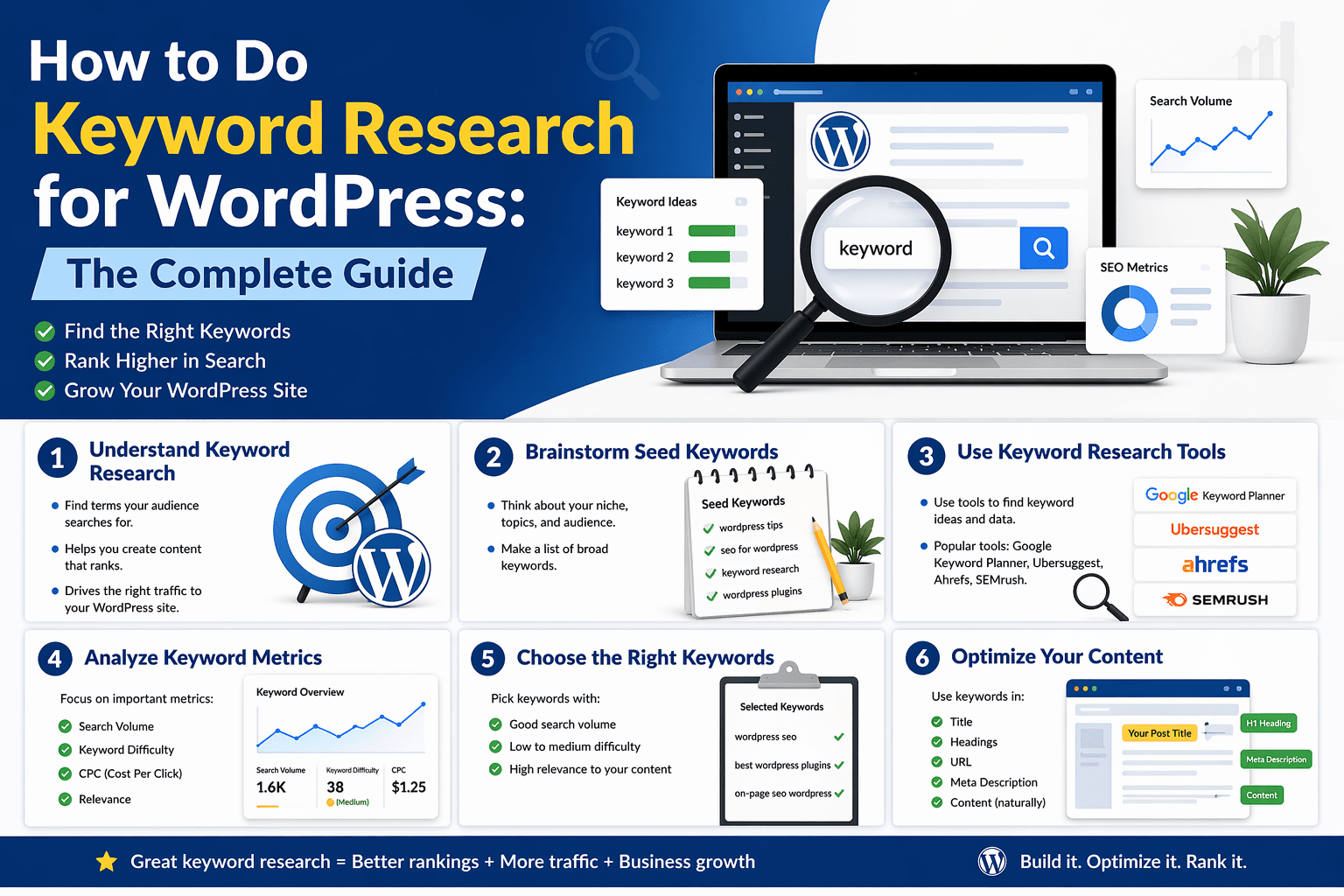
Here’s the practical workflow — from a blank starting point to a prioritized keyword list ready to drive your content plan.
Step 1: Define Your Core Topics (Seed Keywords)
Before finding specific keywords, identify your 4–6 core topic areas — the broad subjects your WordPress site covers. These become the top-level categories of your keyword research.
For WPMazic, core topics might be:
- WordPress SEO
- WordPress Performance
- WordPress Security
- WordPress Admin / Agency Management
- WooCommerce SEO
- WordPress Plugins
These seed topics are the starting points you’ll expand into specific keywords. They should directly reflect what your ideal reader is trying to accomplish.
Step 2: Expand Each Topic Into a Keyword List
For each core topic, generate a broad list of related keywords using 2–3 of the tools above. Don’t filter yet — collect everything that’s topically relevant.
For the topic “WordPress SEO,” your expansion might include:
- WordPress SEO guide
- how to improve WordPress SEO
- best WordPress SEO plugin
- WordPress technical SEO
- WordPress on-page SEO
- keyword research WordPress
- WordPress schema markup
- WordPress sitemap
- WordPress meta description
- WordPress SEO checklist
- WordPress rank higher Google
- why is my WordPress site not ranking
- how to fix WordPress SEO
At this stage, aim for 50–100 keywords per core topic. Quantity now, quality filtering later.
Step 3: Evaluate Each Keyword on Three Dimensions
Now filter your list using three criteria:
Search Volume
How many people search for this term per month? Higher volume = more potential traffic. But don’t discard low-volume keywords — a keyword searched 100 times per month with clear buyer intent can drive more revenue than a keyword searched 10,000 times with diffuse informational intent.
For a newer WordPress site, focus on:
- Long-tail keywords with 100–1,000 monthly searches — achievable and often underserved
- Question-based keywords (“how to,” “why does,” “what is”) — great for featured snippets and AI citation
Keyword Difficulty
How hard is it to rank for this term, given your site’s current authority? Most tools provide a difficulty score (typically 0–100). A new WordPress site targeting “SEO” (difficulty 95+) will spend years with no results. The same site targeting “how to add schema markup to WordPress” (difficulty 20–35) can rank within weeks of publishing a good post.
Realistic difficulty targets by site stage:
- New site (DA 0–20): Target KD 0–25
- Growing site (DA 20–40): Target KD 15–40
- Established site (DA 40+): Can compete for KD 40–60+ depending on content quality
Business Relevance
Does ranking for this keyword bring visitors who are likely to become customers or readers you want? A post targeting “best running shoes” might attract traffic to a WordPress plugin site if it ranks, but those visitors have zero interest in your products. Business relevance keeps your keyword strategy connected to actual commercial or audience-building goals.
Score each keyword 1–5 on business relevance: 5 = very likely to bring ideal visitors, 1 = tangentially related at best. Prioritize keywords with high relevance even if volume isn’t the highest.
Step 4: Assign Keywords to Content Types
Every keyword on your prioritized list should be assigned to a content type based on its intent:
- Informational keywords → Blog posts, guides, tutorials
- Commercial keywords → Comparison posts, review posts, “best of” articles
- Transactional keywords → Product pages, landing pages, pricing pages
- Navigational keywords → Brand homepage, product pages, documentation
This step prevents the common mistake of writing a blog post for a transactional keyword (the searcher wanted a product page) or vice versa.
Step 5: Map Keywords to Your Topic Cluster Structure
Organize your keyword list into clusters around each core topic. Identify:
- Pillar keyword: The broad, high-competition keyword your comprehensive pillar post targets (e.g., “WordPress SEO”)
- Cluster keywords: More specific, lower-difficulty keywords each cluster post targets (e.g., “WordPress keyword research,” “WordPress schema markup,” “how to fix Core Web Vitals WordPress”)
Each cluster post links back to the pillar, and the pillar links to each cluster post. This interconnected structure builds topical authority across your entire core topic — which is how newer sites can compete with established ones in their niche.
Step 6: Check What’s Already Ranking (SERP Analysis)
Before writing a post targeting any keyword, search that keyword in Google and study the first page of results. Ask:
- What content format do the top results use? (Long-form guide, list post, product page, video?)
- How long are the top posts? (Word count gives you a rough target)
- What subtopics do all top results cover? (These are non-negotiable inclusions in your post)
- What subtopics are missing from top results? (These are your differentiation opportunities)
- Does an AI Overview appear? (If so, read it — it tells you what Google considers the most authoritative answer, which should inform your content structure)
- What’s the Domain Authority of the competing sites? (Tells you how realistically competitive your site can be for this term)
This analysis takes 10–15 minutes per keyword and dramatically improves the quality of what you produce.
Part 5: Applying Your Keywords in WordPress
Finding the right keywords is only the first half of the process. The second half is placing them correctly in your WordPress content so search engines can clearly understand what each post is about.
Where to Place Keywords in WordPress
SEO Title (Title Tag)
Your SEO title — set in WPMazic SEO’s post panel, separate from your H1 — is the most important single keyword placement on the page. Include your primary keyword, ideally in the first 30 characters. Keep the full title under 60 characters to avoid truncation in SERPs.
Example: “Keyword Research for WordPress: Complete 2026 Guide | WPMazic”
Set this in WPMazic SEO → Post panel → SEO Title for every post you publish.
Meta Description
Your meta description (140–155 characters) should include your primary keyword naturally and describe what the reader gains from the post. It doesn’t directly affect rankings but significantly affects click-through rate — which does affect rankings indirectly.
Set in WPMazic SEO → Post panel → Meta Description.
URL Slug
Your post’s URL should include the primary keyword in a short, clean format. WordPress automatically generates a slug from your post title — review and edit it before publishing if the auto-generated version is too long or includes unnecessary words.
Example slug: /keyword-research-for-wordpress/
H1 Heading
Your post’s H1 (usually your WordPress post title) should include the primary keyword. It can be a slightly expanded or more descriptive version of the SEO title — both should include the keyword but they don’t have to be identical.
First 100 Words of Body Content
Include your primary keyword once, naturally, within the first 100 words of body content. This is a relevance signal to Google that the page is genuinely about the indicated topic from the start.
H2 and H3 Subheadings
Include your primary keyword in at least one H2 subheading, and naturally work secondary/related keywords into other subheadings where they fit. Don’t force keywords into every heading — only where they genuinely fit the section’s topic.
Body Content (Natural Distribution)
Don’t target a specific keyword density. Write naturally about your topic, using the keyword and its synonyms/related terms where they fit the context. Google’s semantic understanding means it can identify relevance from natural language — not just from literal keyword repetition.
Image Alt Text
Include your primary keyword in the alt text of your featured image, and use descriptive (not keyword-stuffed) alt text on all other images. Set alt text when uploading images in the WordPress media library or in the image block settings.
Internal Link Anchor Text
When linking to this post from other posts, use anchor text that includes or relates to the primary keyword. Varied, descriptive anchor text (partial match, descriptive) is more natural and more effective than repeating the exact keyword as the anchor on every link.
Using WPMazic SEO’s Focus Keyword Analysis
Once you’ve written your post and are ready to optimize, enter your target keyword in the Focus Keyword field in the WPMazic SEO post panel. The plugin analyzes your post and signals whether the keyword appears in:
- Your SEO title
- Your meta description
- Your URL slug
- Your H1 heading
- The first paragraph of body content
- At least one subheading
- The featured image alt text
WPMazic SEO Pro extends this with an advanced multi-keyword workflow — you can track a primary focus keyword and secondary keywords simultaneously, getting analysis against all of them in one post-level view. This is particularly useful for posts targeting a primary keyword plus several semantic variations you want to rank for in the same post.
Part 6: Keyword Research for Specific WordPress Site Types
Keywords for WordPress Blogs
Blog keyword strategy should cover all three funnel stages:
- Top of funnel (informational): “how to,” “what is,” “guide to,” “tips for” — attract new visitors learning about your topic area
- Middle of funnel (commercial): “best,” “vs,” “comparison,” “review” — attract visitors comparing options relevant to your content niche
- Bottom of funnel (transactional): Product or service keywords for any offerings you sell or affiliate-promote
For a WordPress plugin blog like WPMazic, this translates to: educational posts about WordPress SEO (top of funnel) → comparison posts about WPMazic vs competitors (middle) → product pages for WPMazic SEO Pro and Admin Framework Pro (bottom).
Keywords for WooCommerce Stores
WooCommerce keyword research covers three distinct content types:
Product page keywords: Specific, commercial-intent terms that match what someone would search when looking for that exact product. Include brand name, model, key attribute. Example: “Bellroy Slim Sleeve Wallet RFID Protection.”
Category page keywords: Broader commercial terms that match what someone searches when they know the product type but haven’t chosen a specific model. Example: “slim minimalist wallets,” “men’s RFID wallets.”
Blog content keywords: Informational terms that attract researchers and buyers in the earlier discovery phase. Example: “how to choose a slim wallet,” “what is RFID protection in wallets,” “best wallets for travel.”
Keywords for Local Business WordPress Sites
Local keyword research targets geographic modifiers:
- Service + city: “WordPress developer Chicago,” “emergency plumber Austin TX”
- Service + neighborhood: “coffee shop River North Chicago” — lower competition, higher conversion
- Service + “near me”: Handled by Google’s location data — you optimize for this through Google Business Profile, not through targeting the literal phrase “near me”
- Question-based local: “how much does a plumber cost in Chicago,” “best Italian food downtown Denver” — targets researching searchers who are still in decision mode
Keywords for WordPress Agency Sites
Agency keyword strategy is driven by service offering and client type:
- Service + location: “WordPress agency Chicago,” “WordPress development services London”
- Service + industry: “WordPress developer for restaurants,” “WordPress SEO for law firms”
- Problem + solution: “fix WordPress site not ranking,” “WordPress site hacked recovery”
- Tool comparison: “best WordPress maintenance service,” “managed WordPress hosting comparison”
Part 7: Keyword Cannibalization — The Silent Ranking Problem
Keyword cannibalization happens when two or more pages on your WordPress site compete for the same keyword. Google has to choose which page to rank — and often ranks neither one as highly as a single, consolidated page would rank.
How to Identify Keyword Cannibalization
Search site:yourdomain.com "focus keyword" in Google to see which pages on your site Google is indexing for a specific term. If two or more pages appear for the same target keyword, you have potential cannibalization.
More systematically, use Google Search Console: filter the Performance report by a specific keyword and check how many pages are receiving impressions for that query. Multiple pages = cannibalization risk.
How to Resolve It
- Consolidate: Merge the two competing posts into one comprehensive post. 301 redirect the weaker URL to the stronger one. This combines their authority and sends a clear signal about the canonical page for that keyword.
- Differentiate: If both posts serve genuinely different intents despite similar keywords, make the intent difference clearer in the titles and meta descriptions so Google can distinguish them.
- Use canonical tags: If you intentionally need both pages to exist but want to signal one as primary, set a canonical tag on the secondary page pointing to the primary. WPMazic SEO handles canonical tag settings per post from the post panel.
Part 8: Tracking Keywords and Measuring Results
Keyword research isn’t finished once you’ve published the post. You need to monitor whether your targeted keywords are actually ranking, and how rankings are trending over time.
Using WPMazic SEO Pro’s Rank Tracker
WPMazic SEO Pro’s built-in Rank Tracker is the most convenient option for WordPress site owners who want ranking visibility without a separate paid tool. After setting up your target keywords in the Rank Tracker module, the plugin monitors your Google positions and displays trend data directly inside your WordPress admin dashboard.
Configure the Rank Tracker with:
- Your primary keyword for each important post
- Your most commercially important keywords (product-adjacent terms)
- Key comparison terms you’re competing for
Check rank movement weekly. When a keyword you’re targeting moves from position 18 to position 9, that’s a signal the content is working — perhaps a few internal links or a content refresh will push it to page one. When a keyword drops from position 5 to position 12, investigate: was there a Google algorithm update, a competitor publishing stronger content, or a technical issue on the page?
Google Search Console for Keyword Performance
GSC’s Performance report is your free baseline for tracking keyword performance. Filter by a specific URL to see all the queries that URL receives impressions for — this shows you not just what you targeted, but what Google is deciding to show your page for. Sometimes pages rank for unexpected queries that reveal new keyword opportunities or content gaps you didn’t anticipate.
Setting Realistic Ranking Timelines
Keyword rankings take time to develop. For a new post on a competitive keyword, expect:
- Weeks 1–4: Google crawls and indexes the post. May appear in positions 30–100+
- Months 1–3: Positions typically stabilize or improve as Google evaluates engagement signals and compares against competing content
- Months 3–6: Steady improvement toward page 1 if the content is high quality and the keyword difficulty matches your site’s authority
- Months 6+: Continued compounding as internal links, external backlinks, and content updates accumulate
Low-competition long-tail keywords can rank within days or weeks of publication on an established site. Highly competitive head terms may take 12–18 months of sustained content and link building. Set expectations based on difficulty score and your site’s current authority level.
Keyword Research Quick-Reference Checklist
Discovery Phase
- ✅ Core topic areas (seed keywords) defined
- ✅ Keyword list expanded using 2–3 tools (GSC, Keyword Planner, Ahrefs/Semrush)
- ✅ Question-based keywords collected from People Also Ask and AnswerThePublic
- ✅ Competitor keyword gap analysis completed
Evaluation Phase
- ✅ Search volume checked for each keyword
- ✅ Keyword difficulty assessed against site authority
- ✅ Business relevance scored for each keyword
- ✅ Search intent identified (informational / commercial / transactional / navigational)
Planning Phase
- ✅ Keywords assigned to content types (blog post / product page / pillar / cluster)
- ✅ Topic clusters mapped (pillar keyword + cluster keywords)
- ✅ SERP analysis completed for priority keywords
- ✅ Keyword cannibalization checked — no two pages targeting the same primary keyword
Implementation Phase
- ✅ Primary keyword in SEO title (WPMazic SEO post panel)
- ✅ Primary keyword in meta description (WPMazic SEO post panel)
- ✅ Primary keyword in URL slug
- ✅ Primary keyword in H1 and at least one H2
- ✅ Primary keyword in first 100 words of body content
- ✅ Primary keyword in featured image alt text
- ✅ Focus keyword entered in WPMazic SEO → Focus Keyword field
- ✅ Secondary keywords distributed naturally in body content
Monitoring Phase
- ✅ Target keywords added to WPMazic SEO Pro Rank Tracker
- ✅ Google Search Console Performance report reviewed monthly
- ✅ Ranking improvements and drops tracked weekly
- ✅ Top 10 posts refreshed quarterly with updated keyword analysis
Frequently Asked Questions About WordPress Keyword Research
What is keyword research for WordPress?
Keyword research for WordPress is the process of identifying the exact words and phrases your target audience types into search engines, then using those terms to optimize your posts, pages, and metadata. It tells you what topics to write about, how to title your content, which words to use in headings and body text, and how to structure your site for search visibility. Good keyword research connects your WordPress content to real search demand — so you attract visitors who are actively looking for what you offer.
What are the best free keyword research tools for WordPress in 2026?
The best free tools include Google Search Console (shows queries your site already ranks for), Google Keyword Planner (volume data, requires a free Google Ads account), Google Autocomplete and People Also Ask (real-time user question insights), Ubersuggest free tier, AnswerThePublic, and Ahrefs Webmaster Tools for verified site owners. For paid tools with comprehensive data, Ahrefs, Semrush, and SE Ranking are the most widely used among WordPress site owners.
How many keywords should I target per WordPress post?
Each WordPress post should have one primary focus keyword — the single most important search term you want that post to rank for. Beyond that, naturally include 3–5 semantically related secondary keywords. Targeting multiple unrelated primary keywords in one post dilutes focus and confuses Google’s understanding of the page. Write for one topic, one primary keyword, with naturally varied related language throughout the content.
How do I add a focus keyword to a WordPress post?
Enter your target keyword in the Focus Keyword field in the WPMazic SEO post panel, found below the editor when writing any post. The plugin analyzes your content against that keyword and signals whether it appears in your title, meta description, URL slug, first paragraph, headings, and image alt text. WPMazic SEO Pro supports advanced multi-keyword targeting for posts where you’re optimizing for a primary keyword plus closely related secondary terms simultaneously.
How do I track keyword rankings in WordPress?
WPMazic SEO Pro includes a built-in Rank Tracker that monitors your target keywords’ Google positions over time directly inside your WordPress admin — without a separate subscription. Google Search Console also shows query performance data for free. Paid tools like Ahrefs and Semrush offer more granular rank tracking with historical data and competitor comparison.
Keyword research is the strategic foundation that every other WordPress SEO effort builds on. Without it, you’re writing for topics no one searches for or competing for terms you can’t realistically rank for. With it, every post you publish is positioned to attract real visitors who need exactly what you’re offering.
Start with Google Search Console and what you already rank for. Expand into free tools. Build your topic clusters. Enter focus keywords into WPMazic SEO’s post panel for every post you write. And use WPMazic SEO Pro’s Rank Tracker to measure whether your keyword targeting is translating into actual position improvements over time.
Keyword research isn’t a one-time project — it’s an ongoing discipline that compounds the longer you practice it.
→ Ready to put your keywords to work? Explore WPMazic SEO Pro — built-in focus keyword analysis, multi-keyword workflow, and rank tracking, all inside WordPress.