Article Guide
Use these jump points to move through the article faster.
Something shifted in how people experience search results, and it happened faster than most website owners expected. Google AI Overviews — the AI-generated summaries that now appear above traditional organic results for millions of queries — aren’t a future feature anymore. They’re the current reality of how a significant percentage of your potential visitors first encounter answers to their questions.
For WordPress site owners, this creates both a challenge and an opportunity. The challenge is that AI Overviews can absorb traffic that used to flow to your site — answering questions directly in the SERP without requiring a click. The opportunity is that pages cited by AI Overviews often see increased branded recognition, trust signals, and still receive clicks from users who want the full context behind the AI’s summary.
The question isn’t whether to optimize for AI search. At this point, you need to optimize for both traditional search rankings AND AI search visibility simultaneously. The good news is that these two goals align more than they diverge — well-structured, accurate, authoritative content serves both.
This guide explains what AI search optimization means for WordPress in practical terms, how to structure your content to be cited by AI systems, what role schema markup and E-E-A-T play in the equation, and how tools like WPMazic SEO support this new layer of optimization.
What Are Google AI Overviews and Why Do They Matter for WordPress?
Google AI Overviews (previously called Search Generative Experience or SGE) are AI-generated answer cards that appear prominently at the top of Google search results for informational and some commercial queries. They synthesize content from multiple web sources and present a direct answer — often with citations pointing to the sources Google’s AI drew from.
When a user searches “how do I speed up my WordPress site,” they might see an AI Overview at the top of results that summarizes the core steps — caching, image optimization, CDN, plugin management — with small citation tiles showing the sources. Those cited sources get a form of visibility even in a zero-click environment.
For WordPress site owners and agencies, this matters in several ways:
Zero-click searches are increasing. More queries get answered in the SERP without a click. Traffic patterns for informational content have shifted. Sites that relied heavily on top-of-funnel informational posts as traffic drivers are seeing changes in organic click volumes.
Being cited by AI Overviews is the new featured snippet. Just as appearing in a featured snippet position drove significant visibility and trust signals, having your WordPress site’s content cited in an AI Overview gives you exposure to users who may not click through but do absorb your brand as a source.
The content that gets cited follows specific patterns. AI systems don’t randomly pick sources. They favor structured, accurate, comprehensive, clearly attributed content. Understanding those patterns is how you optimize.
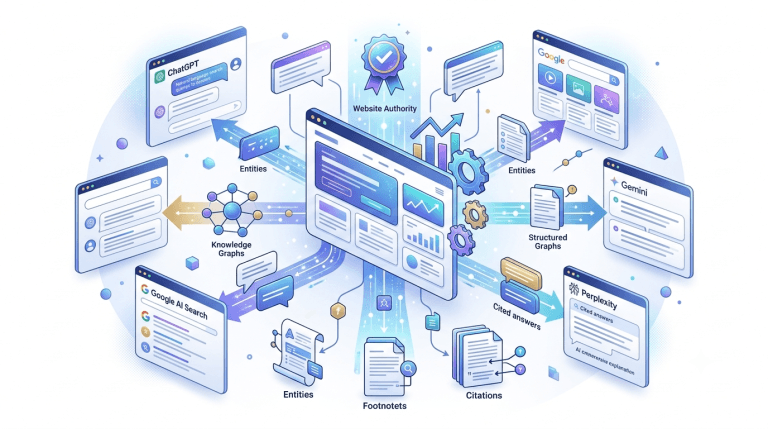
Answer Engine Optimization (AEO) is now a real discipline. AEO refers to the practice of structuring your content specifically to be discovered, understood, and cited by AI-powered answer systems — Google AI Overviews, ChatGPT, Perplexity, Microsoft Copilot, and others. For WordPress sites, this means specific content formatting, schema implementation, and credibility signals.
Part 1: How AI Systems Choose Which Content to Cite
Before you can optimize for AI search, you need to understand how these systems select sources. While AI systems don’t publish their exact selection criteria, there are consistent patterns that emerge from analyzing which content gets cited.
Directness and Clarity of Answers
AI systems favor content that answers questions directly and clearly, without making the reader work through unnecessary preamble to get to the actual answer. If a user asks “what is schema markup in WordPress,” the ideal content for AI citation answers that in the first paragraph — not after three paragraphs of generic SEO background.
This runs counter to the old SEO approach of front-loading keyword-stuffed introductions before getting to the point. AI systems reward directness. Write your answers in the first sentence or two, then expand with context.
Heading Structure as Answer Mapping
AI systems use your heading structure (H2, H3, H4) as a map to understand what questions your content addresses. Each heading should correspond to a clear question or topic that your following paragraphs answer.
Consider structuring your content so that if you extracted just the headings, they’d form a logical question-and-answer outline. This doesn’t mean every heading has to be a question — but each heading should clearly signal what the reader will learn in that section.
Factual Accuracy and Citing Sources
AI systems have been tuned to favor factually accurate, verifiable content. In practice, this means:
- Making specific, accurate claims rather than vague generalities
- Citing statistics, research, or authoritative sources where claims need support
- Not making assertions that contradict well-established information
- Updating outdated information — AI systems appear to factor in recency signals
For a WordPress plugin site like WPMazic, this means writing with specificity: not “WPMazic SEO helps with technical SEO” but “WPMazic SEO includes built-in redirect management, XML sitemap generation, and JSON-LD schema output that can be configured from a single WordPress admin dashboard.”
Content Comprehensiveness Within Topic Scope
AI Overviews tend to be synthesized from sources that provide comprehensive coverage of a topic. A thin post covering one angle of a topic is less likely to be cited than a thorough piece that covers the topic’s key facets.
This doesn’t mean endless word count — it means covering the important dimensions of a topic without gaps. A post about WordPress caching that doesn’t mention server-level caching, browser caching, and object caching isn’t truly comprehensive on the topic, regardless of word count.
E-E-A-T: The Credibility Foundation
Experience, Expertise, Authoritativeness, and Trustworthiness (E-E-A-T) are Google’s framework for evaluating whether a source is credible and high-quality. AI systems appear to weight E-E-A-T signals when selecting sources.
We’ll cover E-E-A-T in depth later in this guide, but the short version: your site needs signals that demonstrate the author and organization behind the content have genuine expertise and can be trusted. Author bios, about pages, organizational transparency, and consistent quality across your content all contribute.
Part 2: Structuring WordPress Content for AI Citation
The way you format and structure your WordPress content has a direct impact on whether AI systems can parse and cite it effectively.
Lead with the Answer
Every piece of content targeting an informational or commercial query should answer the primary question within the first 100 words. This is the “direct answer paragraph” approach — give the AI system a clean, quotable response to the question your title/heading poses.
Example structure for a blog post about WordPress speed optimization:
Traditional approach (bad for AI): “Website speed is one of the most important factors in modern web performance. In today’s competitive digital landscape, users expect fast-loading experiences. Research has shown that slow websites lead to higher bounce rates and lower conversion rates. With that in mind, let’s explore what you can do to make your WordPress site faster…”
AI-optimized approach: “To speed up a WordPress site, start with three high-impact actions: install a caching plugin, optimize and compress your images, and choose a hosting provider with fast Time to First Byte (under 200ms). These three steps alone resolve the majority of WordPress speed issues. Beyond those foundations, additional improvements include using a CDN, minimizing plugin count, and enabling WebP image serving.”
The second version answers the question immediately. An AI system can cite that paragraph directly. The first version gives it nothing to work with.
Use the “What / Why / How” Structure
For each major section of your post, follow a simple structure:
- What is this concept/feature/step?
- Why does it matter (specific impact, not vague generality)?
- How do you implement it (concrete steps, not theoretical advice)?
This pattern creates naturally structured content that maps well to how AI systems synthesize answers — they look for definition, rationale, and implementation.
Format FAQ Sections Explicitly
FAQ sections are one of the most powerful content formats for AI search optimization. AI Overviews frequently pull directly from FAQ-formatted content when answering conversational queries.
Structure your FAQ sections so:
- Each question is a complete sentence that mirrors how a real user would ask it
- Each answer is self-contained — it makes sense on its own without requiring the reader to have read the full post
- Answers are concise (2–4 sentences) for simple questions, or structured with a brief answer followed by explanation for complex ones
After writing your FAQ section in the body of the post, implement FAQPage schema to mark it up for Google’s structured data processing. WPMazic SEO lets you assign FAQPage schema to specific posts and map the questions and answers through the plugin’s interface, so Google sees both the HTML content and the structured data representation.
Use Clear Numbered Lists for Processes
When describing a process or a set of steps, use numbered lists rather than prose. AI systems parse structured list data efficiently and often reproduce list-format answers in AI Overviews.
The structure that works well:
- Brief heading that describes the step
- One to three sentences explaining what the step involves and why it matters
- A concrete example or implementation note
For WordPress-specific content, this might look like a “How to configure redirects in WPMazic SEO” section that walks through each step numerically, with each step being a clear action the reader takes.
Include a Summary Section
A concise summary at the end of long-form posts gives AI systems a pre-synthesized overview they can use directly. This isn’t just for user experience — it’s a deliberate signal to AI systems: “here’s the distilled version of everything we covered.”
Keep summaries to 5–8 sentences covering the core conclusions or action items from the post.
Part 3: Schema Markup for AI Search Optimization
Schema markup was always about helping search engines understand your content more precisely. In the AI search era, it’s become even more important — structured data gives AI systems a machine-readable representation of your content that reduces ambiguity.
FAQPage Schema: The Most Impactful for AI Overviews
FAQPage schema explicitly tells Google (and AI systems indexing your content) that specific content elements on your page are questions and their corresponding answers. When AI Overviews synthesize answers to user questions, FAQPage schema makes your Q&A content the most directly usable format.
Implementation on WordPress with WPMazic SEO:
- Write a FAQ section in your post with clear question headings and answer paragraphs
- In the WPMazic SEO post meta panel, enable FAQPage schema for that post
- Map each question-and-answer pair through the plugin’s schema interface
- Validate the output using Google’s Rich Results Test
The FAQ content in your schema must exactly match what’s visible on the page — Google’s guidelines explicitly prohibit FAQ schema that contains content not shown to users.
Article Schema with Author and Organization
Article schema with complete author and organization markup sends strong entity signals to AI systems. It establishes:
- That this is an editorial piece (not user-generated spam content)
- Who wrote it (an identifiable person or organization)
- When it was published and last updated (freshness signal)
- What organization stands behind it (trust signal)
WPMazic SEO handles Article schema automatically for blog posts once you configure your organization details (name, URL, logo) and author profiles in the plugin settings. The resulting JSON-LD gives AI systems a clean signal about the authorship and organizational backing of every piece of content you publish.
HowTo Schema for Process Content
If your content is structured as a step-by-step guide, HowTo schema gives AI systems a machine-readable representation of each step. This is especially valuable for WordPress tutorial content — “how to set up XML sitemaps,” “how to configure redirects,” “how to implement schema in WordPress.”
AI systems summarizing how-to content can pull directly from your HowTo schema structure, making your site the cited source for those process answers.
Speakable Schema: Optimizing for Voice and AI Audio
Speakable schema (a newer schema type) marks specific sections of your content as particularly suitable for text-to-speech synthesis — in other words, the parts of your content that work well when read aloud by a voice assistant or AI audio response.
While still emerging, speakable schema represents one of the forward-looking investments for AI search optimization. For content like product descriptions, key definitions, and summary paragraphs, speakable markup signals to AI systems: “this section is a high-quality answer that translates well to voice response.”
Part 4: E-E-A-T for WordPress Sites — Building AI-Trustworthy Authority
Google’s E-E-A-T framework (Experience, Expertise, Authoritativeness, Trustworthiness) was originally designed to help human quality raters evaluate content. In 2026, it’s also a fundamental signal for AI content selection. AI systems favor sources that demonstrate real expertise and can be trusted to provide accurate information.
Experience: Show the Work, Not Just the Knowledge
“Experience” in E-E-A-T refers to first-hand experience with the topic. Content written by someone who has actually done the thing being described outperforms content that synthesizes secondary sources.
For WPMazic’s blog content, this means writing from the perspective of people who actually build, maintain, and optimize WordPress sites — not generic SEO content that restates commonly available information. Specific examples, actual plugin configurations, real-world scenarios, and authentic problem-solution narratives all signal first-hand experience.
Practically, add experience signals by:
- Including specific real-world examples from actual WordPress implementations
- Adding screenshots or visual examples (with descriptive alt text for AI parsing)
- Referencing specific version numbers, plugin configurations, and actual settings paths
- Being specific about tradeoffs and limitations — experts acknowledge nuance; generic content doesn’t
Expertise: Author Credibility Signals
Expertise signals on WordPress sites include:
- Author bio pages with genuine professional background, not generic 3-line bios
- Author schema on every post that connects the author’s name to an identifiable person
- Consistent topical focus — a blog that covers WordPress plugins, performance, and SEO demonstrates WordPress expertise; one that mixes in unrelated topics doesn’t
- External citations from authoritative sources referencing your content (backlinks from industry publications, WordPress.org, etc.)
WPMazic SEO lets you configure author schema that links each post’s author to a Person entity with associated credentials, social profiles, and professional URL. This creates a machine-readable record of authorship that AI systems can evaluate.
Authoritativeness: Building Topical Authority
Topical authority means your site is recognized as a comprehensive, reliable source within its niche. For WPMazic, that niche is WordPress — specifically SEO, admin workflow, performance, and security.
Building topical authority requires:
- Content depth across your topic cluster — covering all major aspects of your core topics, not just the popular ones
- Internal linking that reinforces topic clusters — pillar posts linked to supporting posts, supporting posts linking back to pillars
- External backlinks from authoritative domains — links from trusted sources in the WordPress ecosystem (WordPress.org plugins directory, WP Tavern, influential WordPress development blogs)
- Consistent publishing quality — every post meeting a high standard, rather than mixing strong content with thin filler
Trustworthiness: The Foundation Everything Else Rests On
Trust signals on WordPress sites include:
- HTTPS on every page — non-negotiable in 2026
- A genuine, complete About page that explains who the organization is
- Clear contact information — phone number, email, physical address where relevant
- A published and accurate privacy policy and terms
- Transparent author attribution on all content
- Accurate, up-to-date information (outdated content with incorrect information damages trust)
- Schema that matches what’s visible on the page — AI systems can detect discrepancies
For plugin sellers like WPMazic, additional trust signals include: a clear refund policy (WPMazic has a 30-day money-back guarantee — this should be prominently linked from content), genuine customer testimonials with specific use cases, and a transparent product roadmap that signals long-term commitment.
Part 5: Optimizing Existing WordPress Content for AI Search
If you’ve been publishing WordPress content for some time, you likely have existing posts that could be improved for AI visibility. This is one of the highest-ROI activities in modern SEO — improving existing indexed content rather than starting fresh.
Content Refresh Process
For each existing post you want to optimize for AI search:
Step 1: Review the current ranking and traffic data In Google Search Console, check which queries the post ranks for, what its impressions and CTR look like, and whether it appears in any AI Overview results. If it’s ranking in positions 3–15 for queries that now trigger AI Overviews, that’s a high-priority refresh candidate.
Step 2: Identify the primary question the post should answer For each post, define the single most important question it answers. Everything else in the post should support answering that question comprehensively.
Step 3: Rewrite the introduction to answer directly Replace the preamble with a direct answer paragraph. The first 100 words should contain the core answer. Use the rest of the post to expand with context, examples, and supporting information.
Step 4: Review and improve heading structure Each H2 and H3 should clearly indicate what question or aspect that section addresses. Rewrite generic headings (“More Information” → “How to Configure WPMazic SEO for Technical SEO Tasks”) to be specific and answer-oriented.
Step 5: Add or improve the FAQ section If the post doesn’t have a FAQ section, identify 3–5 questions related to the topic that your content addresses (or should address) and add a proper FAQ section at the bottom. Then implement FAQPage schema through WPMazic SEO.
Step 6: Update schema markup Ensure Article schema is active with current publication and modification dates. Add FAQPage or HowTo schema where applicable. Validate everything in Google’s Rich Results Test.
Step 7: Update the content for accuracy and freshness Review all statistics, plugin versions, and tool references. Update anything that’s changed since the post was originally published. Add the update date to both the post and the schema’s field.
Content Gap Analysis for AI Queries
Use Google’s “People Also Ask” boxes and AI Overview citations as research tools. When you search for your target topics and see what queries trigger AI Overviews, you can identify:
- Questions your existing content doesn’t answer that your audience is asking
- Content formats that AI Overviews are pulling from (lists, step-by-step guides, definitions)
- Competitor content that’s getting cited and why
Use this research to plan new content that directly competes for AI citation in your topic area.
Part 6: Technical WordPress Settings That Affect AI Search Visibility
Beyond content quality and schema, several technical settings affect whether AI systems can properly access and understand your WordPress content.
Ensure Your Content Is Accessible to AI Crawlers
Most AI systems use web crawlers to index content. Some use their own proprietary crawlers (Google uses Googlebot; OpenAI uses GPTBot; Anthropic uses anthropic-ai). Your robots.txt should not block legitimate AI crawlers if you want your content to be indexed and cited.
Check your robots.txt (yourdomain.com/robots.txt) for rules that might block AI crawlers. A blanket blocks everything. Specific disallows for AI crawlers would also prevent indexing.
If you want to explicitly allow all AI crawlers:
User-agent: *
Allow: /
Sitemap: https://yourdomain.com/sitemap.xml
WPMazic SEO’s robots.txt editor gives you a visual interface to review and modify these rules from the WordPress admin, without needing FTP or server access.
Submit an Updated Sitemap
An XML sitemap helps AI indexing crawlers discover your content more reliably than waiting for link-based discovery. Make sure your sitemap is current, submitted to Google Search Console, and includes all content you want indexed.
WPMazic SEO generates and maintains your sitemap automatically, updating it when new content is published or existing content is modified.
Page Speed Affects AI Crawl Efficiency
AI crawlers, like search engine crawlers, have resource budgets. Slow pages that take 5+ seconds to load are less efficiently indexed than pages that load in under 1 second. While speed isn’t a direct factor in AI citation quality, it affects how reliably and frequently your content is crawled and refreshed in AI indexes.
Maintain fast page speeds through caching, image optimization, and CDN usage — the same performance practices that help traditional SEO also help AI visibility.
Enable Structured Data at the Global Level
For AI search optimization, you want schema markup on every piece of content — not just manually added to individual important posts. WPMazic SEO’s global schema settings let you assign default schema types to all posts (Article/BlogPosting) and all pages (WebPage) automatically. You then override individual posts that need more specific schema types (FAQ, HowTo, Product).
This ensures every piece of content on your WordPress site has at least baseline structured data — which is better than most sites that have schema only on selected pages.
Part 7: Measuring AI Search Visibility
One of the challenges with AI search optimization is that traditional analytics tools weren’t built to measure it. Google Search Console doesn’t explicitly label traffic as “from AI Overview clicks.” But there are proxy signals you can track.
Google Search Console: Watch for These Patterns
- Impressions increasing while CTR decreases: A strong signal that AI Overviews are answering your target queries without requiring a click. Your content is being surfaced (impression) but users are getting the answer from the AI response (no click).
- Position 0 visibility: Search Console sometimes shows ranking data for the AI Overview citation positions.
- Featured snippet appearances: Pages that appear as featured snippets are also strong AI Overview candidates. Track featured snippet wins.
Search for Your Own Queries
Manually search for your target keywords and observe:
- Does an AI Overview appear for those queries?
- Is your site cited in the AI Overview source tiles?
- What format does the cited content take? (This tells you what to emulate)
Track Branded Searches Over Time
AI Overviews that cite your content don’t always drive immediate direct traffic, but they do increase brand recognition. Watch your branded search volume over time — if your content is regularly cited by AI systems, you should see gradual increases in searches for your brand name as users remember seeing your site as a source.
In GA4, segment your branded search traffic (sessions where the medium is organic and the source contains your brand name in the associated query) and track it monthly.
Putting It All Together: AI Search Optimization Workflow for WordPress
Here’s the systematic workflow to implement everything in this guide:
Initial Setup (One-Time)
- Install and configure WPMazic SEO with complete Organization schema (name, URL, logo, social profiles)
- Set default Article schema for all blog posts globally
- Configure author profiles with complete Person schema data
- Verify robots.txt allows all legitimate AI crawlers
- Submit XML sitemap to Google Search Console
- Complete and optimize your About page with team and company information (trust signals)
- Ensure HTTPS is active and all pages load without mixed content
Per-Post Publishing Checklist
- Introduction answers the primary question directly in first 100 words
- Heading structure maps clearly to topic dimensions (not generic headings)
- FAQ section included with 3–5 genuine question-and-answer pairs
- FAQPage schema enabled and mapped in WPMazic SEO
- Article schema auto-applied (verify in Rich Results Test)
- HowTo schema added if post describes a process
- Content is factually accurate with specific details (not vague generalities)
- Author bio linked with genuine credential information
Quarterly Content Audit
- Review top 20 posts by impressions in Search Console
- Identify posts in positions 3–15 for AI Overview-triggering queries
- Refresh those posts: direct answer paragraph, improved headings, updated FAQ section, updated schema dates
- Check for content gaps identified from “People Also Ask” research
- Validate schema on refreshed posts with Rich Results Test
Final Thoughts
AI search isn’t coming for WordPress sites — it’s already here and already changing traffic patterns. The sites that adapt their content strategy to serve AI systems as well as human readers will maintain and grow their visibility. The sites that don’t will see gradual erosion as AI Overviews absorb more of their informational traffic.
The good news is that the optimizations that make your WordPress content effective for AI search — directness, structure, accuracy, comprehensive coverage, genuine expertise signals — are also the things that make it excellent for human readers. AI search optimization and good content strategy converge.
The technical infrastructure for this — schema markup, sitemap management, robots.txt, author schema, structured data validation — is exactly what a well-configured SEO plugin handles. WPMazic SEO is built to manage all of these signals from a centralized WordPress dashboard, so the technical foundation for AI search visibility is handled by your tooling rather than requiring manual intervention on every post.
The content strategy — directness, E-E-A-T, FAQ sections, comprehensive coverage — is your ongoing job. Build it systematically, refresh it regularly, and your WordPress site’s AI search visibility will compound over time.